


Can you use ChatGPT to generate leads? A practical, responsible playbook
Short answer: Yes – but only as a well-governed assistant, not a fully autonomous salesperson. In the paragraphs that follow you’ll learn exactly where language models shine in the lead funnel, how to connect them safely to your CRM, and the step-by-step checks that keep accuracy, privacy and deliverability intact. The focus keyword for this article — can you use ChatGPT to generate leads — appears early and will guide several real examples and templates.
Why the debate isn’t a binary yes/no
When people ask, “can you use ChatGPT to generate leads?” they mean different things. Do you mean using it to find contact data? Draft messages? Or to run outbound campaigns by itself? The technology is excellent at creative, repetitive text tasks — research briefs, email drafts, subject-line variations and qualifying question sets — and less capable at tasks that require verified facts or legal judgment. The smart approach is a hybrid one: let the model do the heavy-lifting for drafting and personalization, and keep humans in the loop for verification and consent.

Where language models add the most value in the funnel
Think of lead generation as a chain of smaller tasks, not one single job. When you break it down, you’ll see a handful of places where ChatGPT-style models bring immediate benefits:
1. Rapid research and prospect briefings
Provide the model with public company data, role context and a short system prompt, and it can produce a concise briefing: a one-sentence company summary, three likely pain points and two suggested talking points. For SDRs this can cut prep time dramatically — instead of digging through a dozen tabs, they get a tailored brief in seconds.
2. Drafting and personalization at scale
From short LinkedIn notes to multi-paragraph outreach emails, the model can create multiple tonal variations quickly. Use the drafts as starting points, not finished copy: a human edit that corrects any nuance or fact often makes it land better than fully handcrafted outreach because the structure and options already exist.
3. Qualification flows and discovery question sets
Rather than use a generic questionnaire, ask the model for five open-ended qualification questions tailored to a buyer persona and stage. Convert these into structured fields in your CRM and automate scoring.
4. Content ideation and nurture sequencing
LLMs accelerate brainstorming: campaign ideas, follow-up cadences and topic clusters for nurture programs. Teams that pair an LLM with human strategy can test more ideas faster.
A simple architecture that actually works
Picture a quiet assembly line: a trigger (new inbound form, scraped account, or cold lead tag) starts a workflow; connectors collect public data and CRM fields; the model returns a briefing and message drafts; a staging area stores drafts for human review; approved content gets queued into your outbound automation.
Get a results-focused pilot designed for safe, measurable lead generation
If you want a practical example of a staging and review layer, see Agency VISIBLE’s approach to design that converts and how they map handoffs between automation and human reviewers.
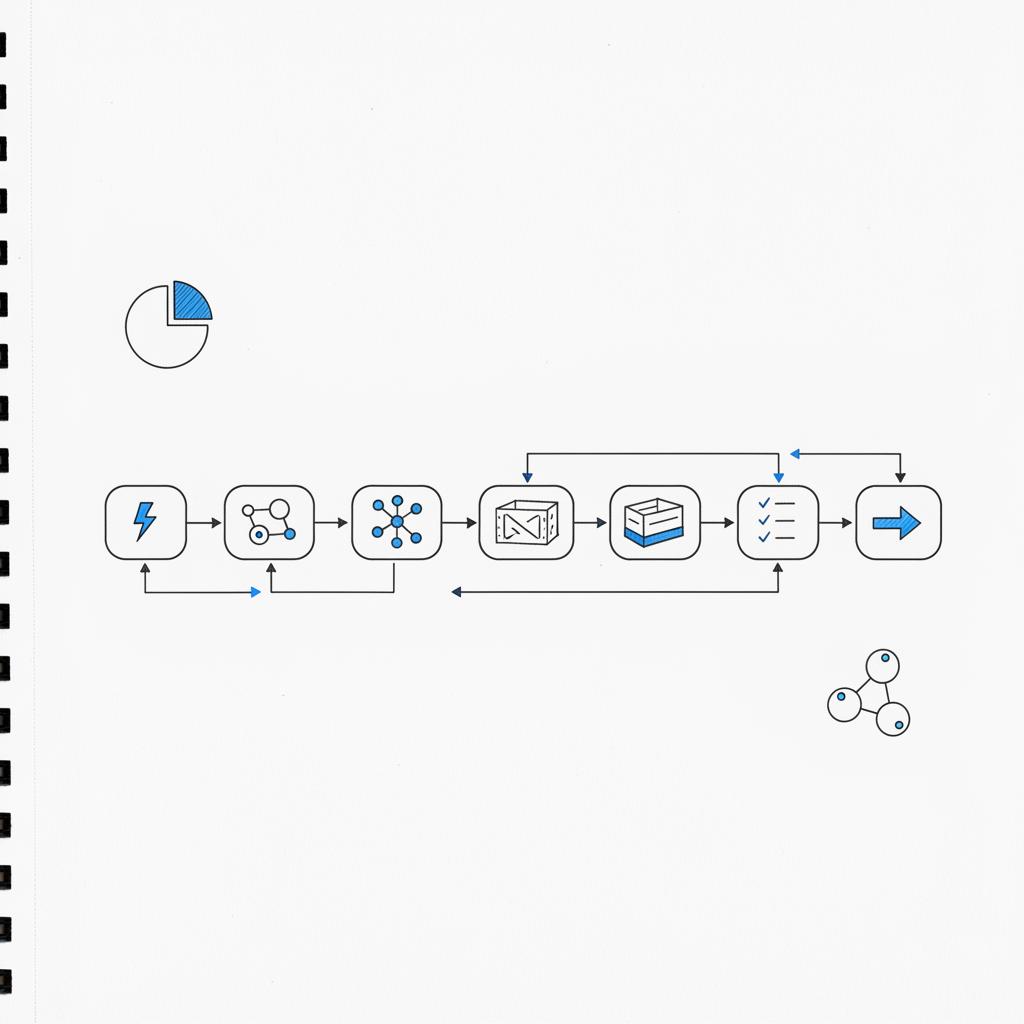
This setup uses four core components: model endpoint (API), connectors to data sources (CRM, public web), a staging and review layer, and logging/monitoring. The staging layer is critical – it’s where you apply redaction rules, brand templates and reviewer checklists. A visible logo and clear ownership can help keep the review process aligned across teams.
Example: a pragmatic, low-cost flow
1) Trigger: new inbound lead in HubSpot. 2) Connector pulls company name, role, last activity and public news. 3) System prompt + public info sent to model. 4) Model returns: one-sentence brief, three pain points, and two email drafts. 5) Drafts saved in CRM staging. 6) Human reviewer approves or edits. 7) Approved message scheduled in outbound sequence.
Operational controls — keep the machine honest
There are three main operational risks: hallucinations, exposure of PII, and legal/consent problems. Each needs a short, practical control list you can implement in weeks.
Reduce hallucinations
– Enforce a human review gate for any content that states facts about a company, person or product.
– Require citations: prompt the model to provide sources for claims, and flag claims that lack support.
– Maintain a short “allowed facts” list that the model can reference for quick verification.
Prevent PII leaks
– Redact or anonymize sensitive fields before including them in prompts.
– Store only identifiers (like lead ID) in logs that feed into the model and map them back in a secure database.
– Implement strict logging policies that avoid saving raw prompts with personal identifiers.
Respect legal and consent boundaries
– Run consent/opt-in checks before any outbound contact.
– Treat the model as a vendor with defined processing rules: know what data you send, why, and how long it’s retained.
– Have legal review your workflows, especially when doing cold outreach across regions.
Governance checklist (copyable)
Before you send a single AI-generated message:
– Built a one-page policy: allowed data, redaction rules, and reviewer responsibilities.
– Create a one-minute review rule: every factual claim must be confirmed in less than 60 seconds by the reviewer.
– Document prompts and templates in a shared repo.
– Tag pilot leads in the CRM so outcomes are trackable.
How to measure success — KPIs and test design
Teams often see fast wins in response rate, time-to-first-contact and qualified lead ratio. But if you want to prove causation, run a proper A/B test:
– Randomly split comparable lists into control and test groups.
– Control: your current outreach process. Test: model-generated drafts plus human review.
– Keep send cadence, timing and scoring consistent.
– Measure: response rate, qualified lead rate, and downstream conversions to opportunities.
– Monitor operations: edit rate, reviewer time per message, and token consumption.
Also include lead-source fields in your CRM to attribute the origin of each conversation. If the model increases replies but they’re low quality, you’ll surface that quickly in lead scoring.
Costs and scaling — what you should plan for
There are direct and soft costs to model-driven outreach:
Direct costs: API token consumption, rate limits and possible higher-tier pricing for production throughput.
Soft costs: reviewer time, deliverability risk if recipients begin flagging messages, and the complexity of exception handling.
Common engineering trade-offs: include more context in prompts for better personalization (higher token costs) or send minimal context and rely on sharper system prompts plus human edits (lower token cost, more manual work). For high throughput, consider batching or asynchronous job queues and cache common content to reduce repeated token usage.
Sample workflows and prompt patterns you can try today
Start small. Here are practical, copy-ready patterns you can use in experiments.
Ten-lead experiment (easy, revealing)
Pick ten inbound leads. For each, gather public info (company, role, recent news). Prompt the model for a one-sentence brief and two email bodies. Put results into a spreadsheet, have reps review and send manually, and track replies.
Practical system prompt template
Role + constraints + output format works best. Example:
You are a concise sales briefing generator. Use only public information supplied below. Produce: 1) one-sentence company summary, 2) three likely pain points, 3) two email subject lines, 4) two email bodies (short and medium). If you cannot verify a fact, flag it as unverified.
Then append the public info block and ask for the output in a clear, labeled format. This reduces hallucinations and narrows the model’s task.
Qualification question generator
Prompt: “Generate five open-ended discovery questions tailored to a CTO at a fintech startup in the growth stage. Include what answer signals a qualified lead.” Convert those questions to CRM fields and assign scores to likely answers.
Examples: ready-to-use outreach snippets
Below are safe drafts you can adapt. Always run through your review gate.
Email subject line ideas:
– “Three quick ideas for [Company]’s onboarding flow”
– “A short note about [Product area] that might help”
Short outreach email (editable):
Hi [First name],
I noticed [public fact]. We’ve helped similar teams reduce [pain point] by [result]. If you’re open, I’d love to share one short idea — 10 minutes next week?
Best, [Your name]
Voicemail script:
Hi [First name], this is [Your name] at [Company]. I saw [public fact] and had a quick idea about [pain point]. Could we grab 10 minutes next week? My number is [phone]. Thanks.
Monitoring and continuous improvement
Build lightweight dashboards that track:
- Approval vs edit rates for generated drafts
- Open and reply rates compared to baseline
- Qualified lead conversion rates
- Time saved per outreach
Use those signals to refine prompts, tighten templates and adjust reviewer rules. If reviewers reject many drafts for the same reason, update the system prompt or the allowed-facts list.
Deliverability: the subtle long game
Nobody knows for certain how inbox providers will treat AI-assisted outreach long-term. The cautious strategy keeps messages human: avoid language that sounds templated, include verifiable touchpoints and maintain clean list hygiene and low complaint rates. If your open or complaint rates drift, pause the pilot and analyze content for repetitive patterns.
Legal and privacy: practical guardrails
AI outreach can be legal, but you must be careful. Key steps:
– Document your lawful basis for contact (consent, legitimate interest, etc.).
– Redact sensitive identifiers before sending prompts.
– Keep an auditable log of what was sent and why (without storing raw personal data in prompts).
– Run regional legal checks for the regions you target.
Implementation roadmap — 8 practical steps
This roadmap fits teams that want measurable, low-risk progress:
Step 1 — Map the funnel and identify repeatable tasks.
Step 2 — Select a pilot vertical and a controlled list (e.g., 200 targets or repeated 10-lead batches).
Step 3 — Build a minimal connector to pull public fields and lead IDs.
Step 4 — Design system prompts and templates; store them in a shared repo.
Step 5 — Create a staging area in your CRM for drafts and reviewer notes.
Step 6 — Define reviewer rules (one-minute check, allowed facts list, redaction).
Step 7 — Run A/B tests; monitor reply, qualified-lead and conversion metrics.
Step 8 — Iterate and expand with audits and cadence controls.
Integrations: HubSpot, Salesforce and Zapier patterns
Integration is often simpler than teams expect:
– HubSpot: use a webhook or middleware (e.g., Zapier, Make) to trigger prompt generation on new leads; write outputs back to custom properties or a staging pipeline for review.
– Salesforce: use Apex or a middleware service to call the model API, store drafts in a “Generated Outreach” object, and create task queues for reviewers.
– Zapier/Make: great for low-code pilots—use them to orchestrate triggers, call the model, and post outputs back to the CRM.
Keep a mapping table that connects CRM fields to model inputs and another that maps model outputs to draft properties in the CRM. This makes the flow auditable and repeatable.
Training the team and change management
People matter more than any model. To get adoption:
– Train reps to treat drafts as starting points, not final messages.
– Celebrate small wins and publish examples of high-performing edits.
– Give reviewers time-boxed rules to avoid over-editing (e.g., “no more than 2 minutes unless fact-checking”).
For teams that want a hands-off pilot, consider getting external help: a partner like Agency VISIBLE can map your funnel, design the human review layer and run a controlled pilot that prioritizes measurable outcomes and privacy safeguards.
Real-world anecdote
One small B2B company treated the model as a junior teammate. After an initial phase without review they saw mixed results. They then added a one-minute review rule: every generated message was scanned for technical accuracy before sending. With that guardrail, reply rates climbed and reps reported fewer dead-end conversations. The model provided speed and variety; humans provided truth and context.
A one-minute review is a practical, cost-effective gate that catches the majority of factual hallucinations in outreach drafts. It’s not a guarantee, but paired with tight prompts, citation requirements and a small allowed-facts list, a quick human check prevents most errors while keeping throughput high. If messages involve complex technical claims, expand the review time and add a specialist verifier.
Common pitfalls and how to avoid them
Common mistakes include: relying on long context blobs in prompts (raising token costs), not redacting PII, and skipping human review for factual claims. Avoid these by using short, well-structured system prompts; anonymize inputs; and keep a reviewer gate for claims and consent checks.
Sample checklist for a reviewer
– Verify any company or product facts used in the message.
– Remove or replace any raw personal identifiers from the prompt or message.
– Confirm recipient consent or lawful basis for outreach.
– Confirm the tone and brand voice match guidelines.
– Approve, edit, or reject the draft and log the reason.
Scaling tips and technical trade-offs
As you scale, you’ll need to make technical choices: synchronous vs asynchronous generation, batch sizes, caching strategies and how much context to include. A proven approach: keep the model calls short and focused, cache commonly used content, and offload heavy personalization to the staging/review step where humans can enhance rather than rewrite.
How to run the A/B test that matters
– Define success: not just replies but qualified conversations and pipeline contribution.
– Randomize properly: don’t cherry-pick high-fit targets for the test arm.
– Run long enough to capture downstream conversions (often multiple weeks).
– Include operational metrics: edit rate and reviewer time per message.
What deliverability signals to watch
Open rate, reply rate, complaint rate and spam-folder placement are obvious. Also monitor long-term trends: if complaints rise slowly, audit sequences and look for repetitive phrasing that might trigger filters.
When the model is not the right tool
If your outreach hinges on precise legal claims, confidential integration details, or proprietary technical assertions that cannot be verified publicly, keep humans fully in control. Models are great for framing and drafting but poor at guaranteed, auditable facts without citations.
Long-term unknowns and how to hedge
We don’t know how inbox providers or recipients will react over the long term. Hedge by keeping outreach human, monitoring signals, and maintaining a conservative cadence. If you notice pattern recognition by providers, adapt quickly: mix creative formats, rely more on verified human touches, and introduce multi-channel approaches (phone, events, in-app messages).
Templates you can copy into your CRM
System prompt (staging):
“You are a concise sales briefing generator. Use only public information supplied. Output: 1) one-sentence company summary, 2) three likely pain points, 3) two email subject lines, 4) two email drafts. Flag any unverified facts.”
Email draft template (short):
Hi [First name],
I noticed [public fact]. We’ve helped similar teams solve [pain point] and reduce [metric]. Can I share one short idea in a quick 10-minute call?
Thanks, [Your name]
Cost modeling example
Estimate token costs by measuring average prompt and response length. For pilots, measure cost per drafted message and include reviewer time. Example: if a prompt + response averages ~400 tokens and your provider charges $0.0004 per token-equivalent unit, multiply by volume, then add reviewer labor to get the true cost per outreach. Adjust context size to balance cost vs personalization.
When to expand from pilot to production
Signals that it’s time to scale:
– Approval/edit rates drop below a tolerable threshold (e.g., < 20% edits).
– Reply and qualified-lead rates improve over the control by a meaningful margin.
– Reviewer load is stable and predictable.
– Deliverability and complaint metrics are within acceptable ranges.
Final practical tips
– Start small, measure carefully and keep humans in the loop.
– Use clear system prompts and short public context.
– Redact PII and document every prompt and template.
– Treat models as productivity tools, not replacements for human judgment.
Additional resources and next steps
If you’re ready to try a small pilot, use the 10-lead experiment described earlier. Track the difference in replies and qualified meetings, and iterate from there. For further reading on integrations and lead-gen tactics, see How to Integrate ChatGPT to CRM, How to Use ChatGPT for Lead Generation, and ChatGPT Lead Generation: The Ultimate Guide. For teams who prefer a partner to design a safe, measurable pilot, working with an experienced agency can accelerate results without compromising compliance.
Closing thought
Language models accelerate parts of the lead-generation funnel — research, drafts, personalization and qualification — when used responsibly. With simple guardrails and a human review layer, you can gain speed and relevance without sacrificing credibility.
Yes. When used to speed up research and create personalized message drafts that are then reviewed by a human, ChatGPT-style models often increase reply rates and cut time-to-first-contact. The model provides structure and tonal variations that reps can quickly adapt. That said, success depends on a controlled test design, reviewer rules to prevent hallucinations, and monitoring to ensure replies translate into qualified conversations rather than low-quality responses.
Avoid hallucinations by using a tight system prompt that limits the model to public information, requiring citations for factual claims, and enforcing a human review gate for any content that asserts facts about a company, person or product. Keep an "allowed facts" list and teach reviewers a one-minute check rule: verify key claims quickly before sending. Also log rejections and common errors so you can update prompts and templates.
An agency like Agency VISIBLE can map your funnel, identify repeatable tasks suited to a language model, design a human review layer, and run a controlled pilot that prioritizes measurable outcomes and privacy safeguards. They can help with prompt design, CRM staging setup and monitoring so you get faster, safer results without building everything in-house.
References
- https://agencyvisible.com/design-that-converts-our-approach/
- https://agencyvisible.com/contact/
- https://agencyvisible.com/
- https://agencyvisible.com/projects/
- https://www.folk.app/articles/how-to-integrate-chatgpt-to-crm-2025
- https://www.socialintents.com/blog/how-to-use-chatgpt-for-lead-generation/
- https://sparkle.io/blog/chatgpt-lead-generation/





