


Do you pay to be on Thumbtack? A clear look at Thumbtack cost for pros
If you run a local service business — a contractor, photographer, cleaner, or electrician — you’ve likely asked: Do you pay to be on Thumbtack? The short answer is yes, but not in the simple subscription way many platforms use. The core model is pay‑per‑lead, and understanding Thumbtack cost means looking past the sticker price to conversion, job value, and how you qualify customers.
This guide walks through how Thumbtack charges professionals, why lead prices differ so widely, how to measure true return with cost‑per‑booked‑job, and practical steps to manage spend so leads become profitable work. Expect clear examples, simple calculations you can adapt, and quick experiments you can run this week.

What pay‑per‑lead really means
With Thumbtack’s pay‑per‑lead approach, you are charged when a prospective customer’s inquiry is delivered to you. That charge is the lead price. You never pay for leads you don’t receive — but several levers change what you actually pay and whether those dollars buy value.
First, you set a maximum lead price for each service. Think of it as a bid: set the cap too low and you’ll rarely see leads; set it higher and volume increases but each lead costs more. Second, lead prices vary by service, geography and season. Third, Thumbtack sometimes adds optional visibility or subscription tools that can increase traffic – for a price. All of these elements influence the effective Thumbtack cost you experience. See Thumbtack’s help center on how max lead prices work.
Why lead prices vary so much
Not all leads are created equal. A homeowner asking to hang a TV is a different sale than one requesting a full kitchen rewire. Thumbtack reflects those differences in price. Typically:
– Quick, low‑value services often have leads under $10.
– Mid‑value services (cleaning, small repairs) commonly fall in the $10–$60 range.
– High‑value trades (major remodels, specialized contractors) often see leads from the tens into the low hundreds.
Two forces drive this range: competition and expected job value. In dense urban markets many professionals chase the same customer and bid pressure pushes lead prices up. Seasonal demand also shifts prices: think landscaping in spring, HVAC in summer. Most importantly, when the average job is large — a $20,000 remodel, for example — paying $100–$300 per lead can still make sense because even a modest conversion rate can yield profitable jobs. Industry write-ups show similar ranges for lead costs (Is Thumbtack Worth It in 2023?).
Thumbtack cost and geography
Zip code matters. The same service in a wealthy metropolitan area often commands higher lead prices than in a rural town. If you serve multiple areas, check each zip code separately, not just an average. That granular view helps you set caps that reflect local economics and avoid overpaying in low‑value pockets.
Yes — a one‑person business can make Thumbtack profitable by focusing on clear service packaging, fast replies, tight qualification (ask for photos and budgets), and disciplined tracking. Small A/B tests and strict max lead price caps let solo pros find the right balance of volume and profitability without hiring more staff; in some cases, a modest subscription or brief visibility boost can help smooth volume while processes improve.
How subscription and visibility features fit in
Thumbtack occasionally offers subscription‑like packages or visibility boosts that sit alongside pay‑per‑lead. These can smooth lead volume when you need steady flow, but they’re an added cost. Subscriptions may make sense for businesses that convert consistently and want predictable volume; they’re less helpful if your conversion rate is weak. Always check the app for current offers and pilot programs in your area before committing.
Agency VISIBLE contact page is a helpful place to start if you want a quick sanity check on tracking and conversion setup. A short consult can show how to log leads, calculate cost‑per‑booked‑job, and test simple response scripts without guessing.
Measure the right thing: cost‑per‑booked‑job, not just cost‑per‑lead
A common mistake is focusing on raw cost‑per‑lead. That number alone is misleading. Low‑cost leads that never book are wasted money. The meaningful metric is cost‑per‑booked‑job — total spend divided by the number of jobs booked that originate from those leads. To judge Thumbtack fairly, always convert lead spend into the cost of an actual booked job.
Example: $500 spent on leads yields 50 leads (avg $10 per lead). If one job books, cost‑per‑booked‑job is $500. If five jobs book, it’s $100. Those $100 may be excellent or terrible depending on your gross margin for that service. The only honest answer comes from pairing lead price with conversion rates and job profit.
Conversion rate is the hinge of profitability
Two factors move conversion rates: response speed and prequalification. Responding quickly is straightforward but powerful — the first competent reply often wins the customer because shoppers contact multiple pros. Prequalifying with a short checklist saves you money later: ask for photos, budget ranges and timeline up front so you spend time only on leads that fit your sweet spot.
Short scripts that increase conversions
A simple, repeatable initial message works. Try this template: “Hi [name], thanks for reaching out — I can help. Can you send two photos and a ballpark budget? I’ll check availability and give a quick estimate.” That message feels personal, asks for the single most helpful qualifying detail (photos), and sets an expectation for follow‑up. Templates like this lift conversion and cut wasted time, which lowers your effective Thumbtack cost per booked job.
Concrete examples and simple calculations
Numbers make decisions clearer. Use these three scenarios to test your own margins and conversion assumptions.
Example 1: the carpet cleaner
– Average job: $150
– Gross margin: $80
– Avg lead price: $8
– Conversion: 10% (1 in 10)
– Cost‑per‑booked‑job = $8 × 10 = $80
That breaks even on gross margin and leaves nothing for overhead. For this business, improve conversion (faster replies, better profiles) or push for lower lead caps and stricter filters.
Example 2: the electrician
– Average job: $450
– Gross margin: $250
– Avg lead price: $45
– Conversion: 20%
– Cost‑per‑booked‑job = $45 × 5 = $225
At $225 cost for a $250 margin, the channel looks reasonable. But if conversion slips to 10%, cost doubles and profitability evaporates. That sensitivity explains why higher lead prices demand tight follow‑up processes.
Example 3: the remodeling contractor
– Average job: $20,000
– Gross margin: $6,000
– Avg lead price: $250 (high competition area)
– Conversion: 5% (1 in 20)
– Cost‑per‑booked‑job = $250 × 20 = $5,000
Even at $5,000 cost, a $6,000 gross margin may justify buying expensive leads. This is why high‑value trades tolerate higher Thumbtack cost figures.
How to read your own numbers
Decide using three figures: your average job gross margin, realistic conversion rate, and average lead price in the zip codes you serve. If you don’t know conversion rate, track it for 30–60 days. Too many pros under‑track and misjudge performance. Track each lead: date, lead price, response time and final outcome. After 30 leads you’ll have a directional conversion rate and can compute cost‑per‑booked‑job.
Setting realistic caps and filters
Start conservative. Choose narrower service categories and tighter geography to avoid low‑value requests. Increase max lead prices only if volume is too low. The goal is to land in a spot where cost‑per‑booked‑job < gross margin, after accounting for overhead and time.
Small A/B experiments that move the needle
You don’t need large budgets to learn. Run small, repeatable tests: change one variable at a time and measure results.
Ideas to test:
– Two identical services with different max lead prices — compare volume and conversion.
– Two response scripts — short vs slightly longer questionnaire.
– Two service-area settings — wider vs narrower radius.
Give each test enough leads (20–50) to see a pattern and then apply the winner. Even modest improvements in conversion rate can dramatically reduce your effective Thumbtack cost.
Practical steps to control Thumbtack cost
Follow a nine‑step routine you can implement this week:
1. Open Thumbtack for Professionals and note current lead prices.
2. Set conservative max lead prices for each service.
3. Narrow service list to what you actually do.
4. Restrict service areas to neighborhoods you prefer.
5. Turn on fast notifications and reply in the first hour.
6. Use a templated first reply asking for photos and a budget.
7. Log every lead in a simple spreadsheet.
8. After 30 leads, calculate cost‑per‑booked‑job and compare to margin.
9. Adjust caps, areas or scripts based on that math.
These steps reduce wasted spend and help you treat Thumbtack as a measurable marketing channel rather than a guessing game.
These steps reduce wasted spend and help you treat Thumbtack as a measurable marketing channel rather than a guessing game.

Profile content and reviews matter
Lead cost matters only if you convert prospects into customers. A clear profile with strong photos of finished work, concise descriptions and a handful of solid reviews acts like a storefront. Businesses that keep profiles updated and show real examples convert better, which lowers effective Thumbtack cost per booked job.
When Thumbtack is a good fit — and when it’s not
Thumbtack suits pros who can do three things well: know their typical job size and margin, respond quickly, and run tests while tracking outcomes. If you have those elements, Thumbtack can be a steady, measurable source of leads.
It may not be ideal if average jobs are tiny with razor‑thin margins, if you can’t reply quickly, or if you don’t track outcomes. In those cases, either change how you package services to attract higher‑value leads or fix processes that improve conversion before increasing spend.
Real‑world anecdote
A local handyperson resisted paying $30 per lead. With a low cap he got two leads per week. Raising it by $15 bumped leads to nine per week, but conversion initially fell. He added one qualification step — ask for two photos and a budget up front. Within a month conversion doubled and his cost‑per‑booked‑job fell into profitable territory. The takeaway: modest spend plus better qualification often beats penny‑pinching on lead price.
Common questions answered
How much will Thumbtack cost per lead for my trade?
It depends on trade, location and season. Expect single digits for low‑value services, mid‑teens to low‑sixties for mid‑value services, and tens to low hundreds for high‑value trades. Always confirm current Thumbtack cost inside the app because Thumbtack runs localized experiments. For another perspective see 7ten.marketing’s live ranges.
Are subscription options worth it?
Subscriptions can be useful if you need predictable volume and you convert reliably. But they rarely replace the need for a solid conversion process. If you don’t convert leads efficiently, a subscription simply gives you more leads that don’t book.
How quickly should I respond?
Aim for the first hour. Customers often message multiple pros; the first competent reply earns a disproportionate share of bookings. If you can’t be fast, craft an automatic first reply that asks for photos and budget and sets expectations for follow‑up.
What’s a good conversion rate?
Conversion varies. Low‑value services may only convert a few percent; higher‑value services can convert at several to tens of percent with fast replies and strong profiles. Use your baseline and work to improve it rather than benchmarking against an abstract number.
How do I set a realistic max lead price?
Start conservative and test. Raise the cap in small steps until you see volume, but always watch cost‑per‑booked‑job to ensure it stays below your job’s gross margin.
Tracking, tools and simple spreadsheets
You don’t need fancy software to start tracking. A basic spreadsheet with columns for date, lead price, contact info, response time, photos received, quote given and outcome is enough. After 30–60 leads you’ll see whether Thumbtack is working. If you prefer help, small agencies like Agency VISIBLE can set up tracking and run a fast experiment for you. Check their projects for examples. A clear logo can help build immediate trust.
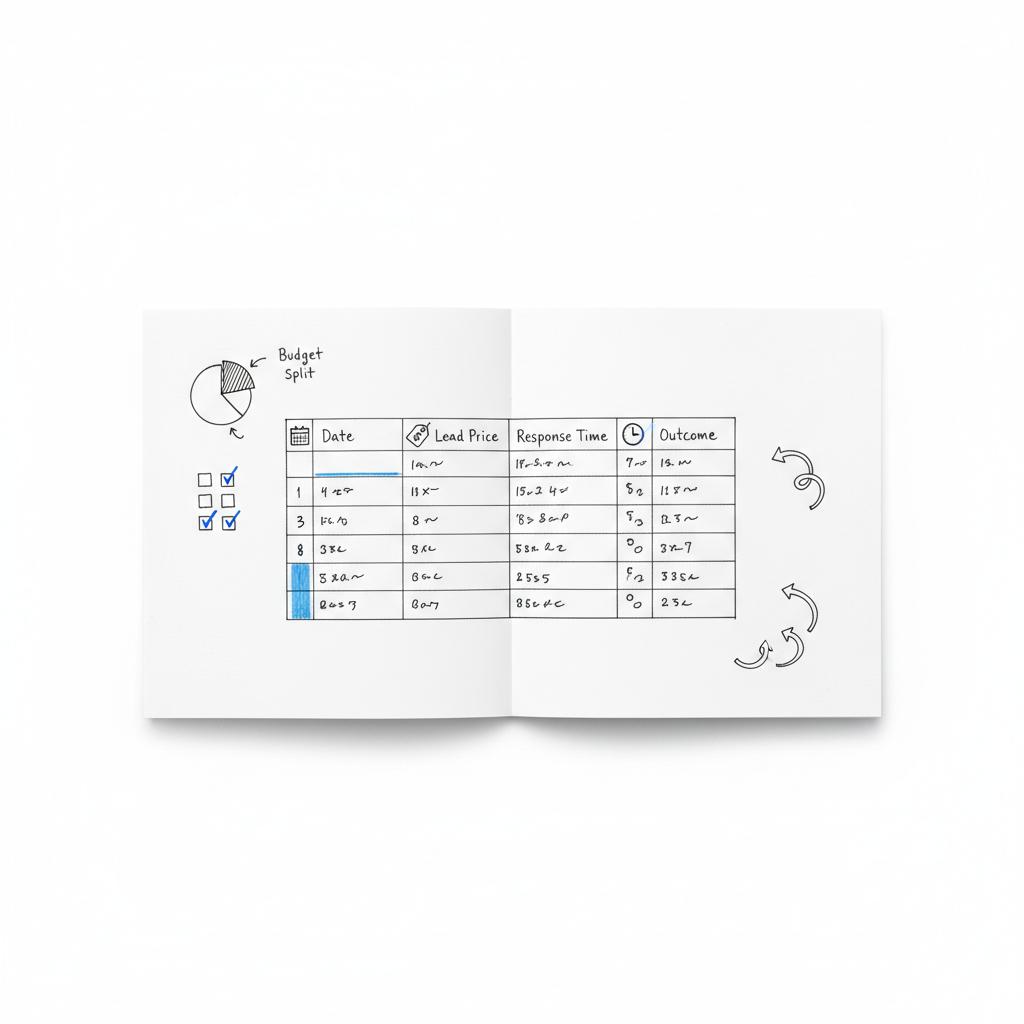
You don’t need fancy software to start tracking. A basic spreadsheet with columns for date, lead price, contact info, response time, photos received, quote given and outcome is enough. After 30–60 leads you’ll see whether Thumbtack is working. If you prefer help, small agencies like Agency VISIBLE can set up tracking and run a fast experiment for you. Check their projects for examples. A clear logo can help build immediate trust.
Scaling up if you find a winner
If cost‑per‑booked‑job is profitable and repeatable, scale carefully. Expand geography incrementally or raise max lead prices where volume lags. Keep testing scripts and keep profiles fresh. Scaling without process is the fastest way to turn a good channel into a poor one.
Five quick scripts and templates
Use short, effective messages to speed qualification:
Initial reply (fast): “Hi [name], thanks — can you share two photos and a ballpark budget? I’ll review and get back in an hour.”
Pricing reply (if photos provided): “Thanks — based on those photos a rough range is $X–$Y. I can give a certified estimate after an on‑site check. When are you free?”
Follow‑up (no response): “Hi [name], wanted to make sure you saw my note — still interested in moving forward?”
Prequalifying question for small jobs: “Do you want this done within 7 days, or later this month? We can prioritize scheduling for urgent jobs.”
Closing message: “We can schedule for [date] and will bring [brief list of what you include]. To reserve, we require a small deposit and a signed estimate.”
What to watch for in Thumbtack experiments
Thumbtack pilots new features and pricing models in local markets. Watch for: changes to lead packaging, new subscription names, or visibility tools that alter lead flow. Always treat the app as the source of truth for current prices and offerings in your zip codes.
When to call it quits on a test
If after 30–60 leads your cost‑per‑booked‑job consistently exceeds gross margin and improvements in conversion don’t close the gap, pause. Pivot to narrower services, different areas, or invest in process improvements before spending more.
Summary checklist: 10 things to do this week
1. Open Thumbtack for Professionals and record lead prices per service and zip code.
2. Set conservative max lead prices.
3. Narrow services to what you really do.
4. Limit geography to preferred neighborhoods.
5. Turn on notifications — reply within an hour.
6. Use a templated first reply asking for photos and budget.
7. Log each lead in a spreadsheet.
8. After 30 leads calculate cost‑per‑booked‑job.
9. Run one A/B test (price cap or message).
10. If needed, ask for help from a small agency like Agency VISIBLE to set up tracking and experiments.
Final thoughts
Pay‑per‑lead platforms like Thumbtack can seem unpredictable. The mechanics are simple: you pay per lead, and your job is to turn leads into profitable booked jobs. The secret is not to obsess over a single lead price, but to measure cost‑per‑booked‑job, reply quickly, prequalify leads and run repeatable tests. That approach turns Thumbtack cost from a scary line item into a manageable marketing investment.
Need help testing Thumbtack or tracking leads?
Lead prices vary widely by trade, location and season. Many low‑value tasks see leads under $10. Mid‑value services like cleaning or small home repairs often range $10–$60. High‑value trades such as major remodeling or specialized commercial work can see leads in the tens to low hundreds. Check the Thumbtack for Professionals app for current zip‑code prices and run a short tracking window to measure your actual costs.
Subscriptions or visibility packages can be useful if you need predictable volume and you reliably convert leads. However, subscriptions rarely replace the need for strong conversion processes. If your conversion rate is low, a subscription will simply deliver more leads that don’t book. Before subscribing, test pay‑per‑lead with tight tracking to confirm your cost‑per‑booked‑job is profitable.
Focus on improving conversion and qualification. Reply faster (aim for the first hour), ask for photos and a budget in your initial message, narrow service categories and geography, and run small A/B tests on lead caps and scripts. Track every lead so you can measure cost‑per‑booked‑job and make decisions based on profit rather than raw lead volume.





