


How to create a website for an event?
Every successful event starts long before the doors open – often the moment someone lands on your event website. A great event website is not about flashy animation or clever effects; it’s about clarity, speed and a registration flow that treats your visitor like a human, not a transaction.

Before you write a single sentence, ask: who is this for and what do I want them to do? That single question drives the pages you need, the copy you write and the features you build. From tiny meetups to large hybrid conferences, the same principles apply – adapted to scale. A clear logo in the header helps visitors orient themselves.
Tip: If you want objective help turning choices into a fast launch, consider talking with Agency Visible — a small, hands-on team that focuses on the registration experience, analytics and integrations in a way that keeps attendee friction low and conversions high.
Start with clear goals and audience
Define whether your goal is to sell paid tickets, collect RSVPs, capture leads or build brand awareness. Each goal changes priorities. For paid events, emphasize pricing, trust signals and an easy checkout. For free events, the focus is on reminders and no-shows reduction. For hybrid or virtual events, access control and streaming reliability become primary concerns.
Consider a simple exercise: write one-sentence goals for your site. Example: “Sell 200 early-bird tickets in four weeks.” Now map what pages and features support that sentence – clear landing page, fast registration, early-bird badge, and automated email confirmations. If you want examples of past work, see Agency Visible’s projects.

Pick the platform that matches the job
Platform choice influences speed to market, control and future flexibility. Common options in 2024-2025 include WordPress with an events plugin, Webflow, Squarespace, Wix, and specialist platforms like Eventbrite or Cvent. Each has pros and cons:
- WordPress — maximum content control, best for long-term SEO and custom flows. Requires hosting and maintenance.
- Webflow — strong visual control and fast front-end; good for marketing-led sites with clean design.
- Squarespace / Wix — fastest for simple event websites and low maintenance, but limited in complex integrations.
- Eventbrite / Cvent — ticketing-first platforms that reduce operational work but can limit design and SEO control.
Match platform to needs: if organic search and content matter, pick a CMS (WordPress/Webflow). If you need to go live quickly with minimal tech support, pick a website builder. If ticketing scale or enterprise integrations are the priority, choose a specialist platform. If you need a quick overview of services, check Agency Visible.
Mobile-first: non-negotiable
More than half of web traffic comes from mobile devices. Design every page and the registration flow with mobile in mind. Make CTAs visible without scrolling, keep forms short, and test onboarding on older phones with poor signals. A fast, simple mobile registration will convert more than a pretty desktop-only flow.
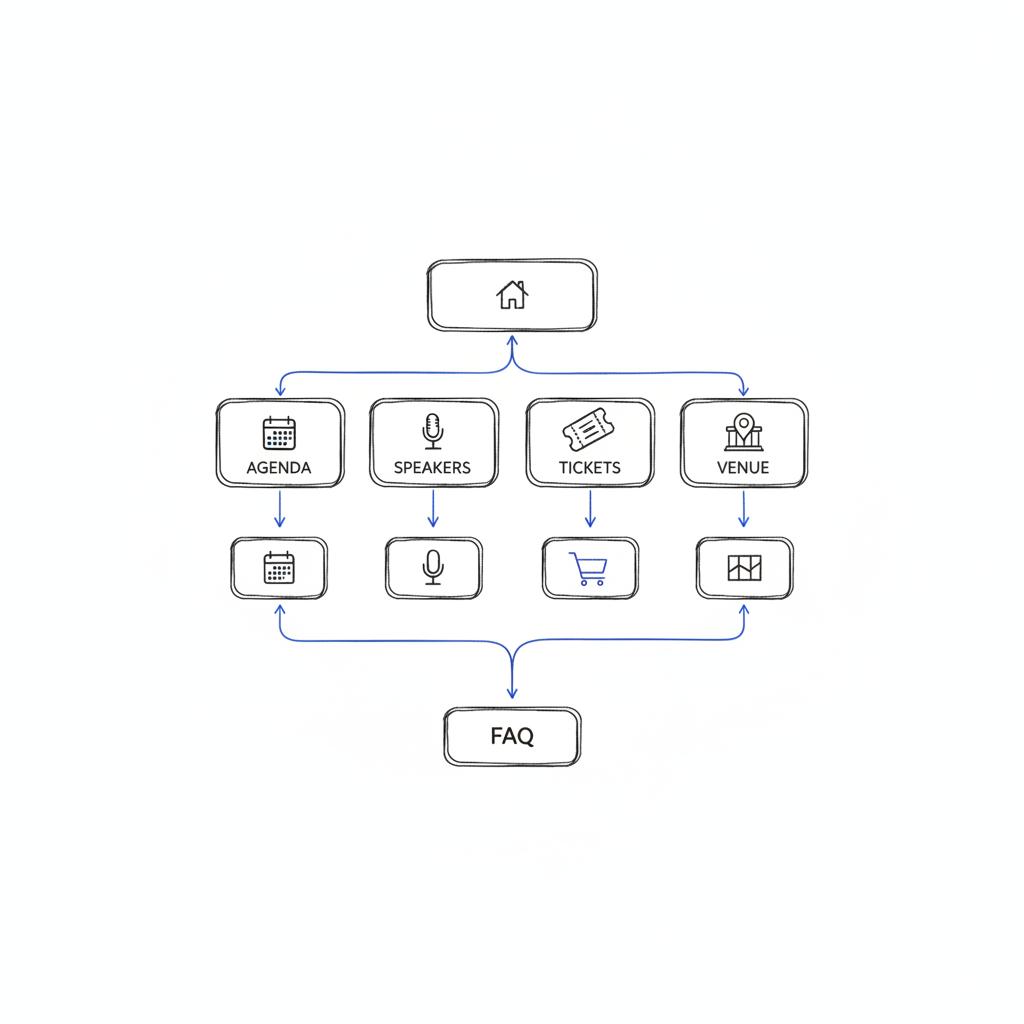
Which pages actually move the needle?
Around dozens of events, a consistent set of pages prove most effective for conversions. Build these first and make each one focused:
Essential pages for an event website
Landing / Home — One clear message: what the event is, who speaks, when and where, and the call to action. Use a scannable layout and one primary CTA.
Agenda — Highlight takeaways not just titles. Attendees buy experiences; show the value of each session.
Speakers — Short bios that answer “why they’re on stage” rather than long CVs. Use real photos and human copy.
Tickets & Registration — Minimal friction, clear pricing, trust signals and an easy checkout. Display taxes and fees transparently.
Venue & Travel — Transit, accessibility, and lodging options. Help reduce logistics anxiety.
FAQ & Contact — Answers to the most common concerns and a clear support path. A good FAQ reduces support load dramatically.
Optional but useful: sponsor pages, code of conduct, accessibility details and speaker resources. These pages signal professionalism and values – important for attendees and sponsors alike.
Ticketing and payments: choose wisely
For most organisers, integrated gateways like Stripe and PayPal offer the right mix of control and reliability. If you use a CMS-based event website, these gateways let you keep the public site under your brand while managing transactions securely.
If you need advanced finance features – automatic VAT invoices, split payments, or sponsor reporting – a platform-native system (Eventbrite/Cvent) can be easier. The trade-off is control: platform-native ticketing may host the checkout off-site or limit how you present the brand.
Email, CRM and automation
Plan email and CRM flows before you open registrations. Hook the registration form into a CRM (Mailchimp, HubSpot) and automate confirmations, tickets, calendar attachments and reminders. Tag registrants by ticket type or interests so you can send targeted pre-event and post-event messages.
Automation reduces manual work and improves the attendee experience: a welcome email with a ticket PDF and calendar invite cuts no-shows and reduces support inquiries.
SEO and structured data for events
Set up Event schema before launch so search engines can display date, location and ticket info directly in results. Use clear page titles and concise meta descriptions. Configure analytics (GA4) with event-tracking that maps to your registration funnel: landing page visits, ticket clicks and completed checkouts.
Testing your tracking before launch prevents blind spots in promotion budgets and helps you know which channels actually drive registrations. For practical SEO checklists see The Complete SEO Checklist, A Comprehensive Technical SEO Checklist, and The Complete SEO Checklist for Online Stores.
Privacy, consent and legal must-haves
Compliance is part of trust. Implement cookie-consent flows and a clear privacy policy that explains how you use attendee data. If you share lists with sponsors, require explicit opt-in. For children’s events, follow special consent rules. Decide and document your data retention policy: who can see attendee lists and how long personal data is stored.
Hybrid & virtual event considerations
Virtual access adds complexity: secure streaming, access tokens, single-sign-on, and rights management for recordings. Be explicit about who owns session recordings, how they may be used and whether on-demand content is included. Test streams on multiple networks and with real users to avoid unpleasant surprises.
Accessibility: practical steps
Accessibility is both ethical and frequently legally required. Practical measures that matter:
- Proper heading order and semantic structure.
- Meaningful alt text for images.
- High color contrast and readable fonts.
- Forms with labels and keyboard navigability.
- Captions or transcripts for video sessions.
Design with people, not checkboxes. Accessibility improves the experience for everyone.
Fraud prevention and ticket security
Protect your event from scalpers, bots and stolen cards. Use email verification for high-value purchases, CAPTCHAs when necessary, and monitor unusual purchasing patterns. Offer tiered promo codes and a manual review step for suspicious orders. For very premium events, a white-glove phone-based confirmation can keep both fraud and friction low.
Designing the registration form
Ask only what you need at checkout: name, email and ticket choice. Push extras – dietary needs, t-shirt sizes, company info – to a secondary form after purchase. If you must collect more, explain why. Transparency reduces abandonment.
Testing: your pre-launch rehearsal
Run a soft launch with staff or friendly users. Verify GA4 events, test payments in sandbox and live modes, and rehearse refunds and waitlist flows. Test the registration flow on older phones and over slow connections. The goal is to find and fix launch-day blockers before you go live.
Content that makes the event feel real
Short, human bios, candid photos and agenda blurbs that focus on outcomes make the site compelling. Use copy that answers “what will I learn?” and “who will I meet?” People buy the experience. Show the benefits.
Promotion: align creative to landing pages
Match ad creative, email messaging and partner links to the landing page. Use UTM parameters to attribute registrations and feed that data back into ad optimization. Give partners and sponsors a toolkit with approved copy and imagery to keep messaging consistent.
Common operational questions
Which platform for SEO? A CMS that gives you control over content and metadata usually performs better than a closed ticketing-platform page. Can you migrate tickets? Yes – plan CSV exports and validate financial reconciliation needs. Refunds and cancellations? Define the policy and automate communications so attendees feel respected even if plans change.
Make registrations easy — talk to a team that moves fast
Ready to reduce attendee friction and launch faster? Contact Agency Visible to get practical help with platform choice, payment integrations and tracking.
Practical checklist — items you can action tomorrow:
- Make primary CTA visible above the fold on mobile.
- Use plain language for pricing and show fees before checkout.
- Offer a calendar file on the confirmation page.
- Prepare an FAQ answer for the most frequent question and feature it prominently.
- Archive content after the event for ongoing SEO value.
A single, scannable landing page with a clear headline, short agenda, three short speaker blurbs, pricing, and a one-step registration form—optimized for mobile and with a visible CTA—often performs better than a multi-page site with the checkout hidden.
Examples of streamlined page copy
Landing headline: “Two days to rethink product growth – join industry leaders on June 12–13.”
Speaker blurb: “Ana Perez — Product leader with 10 years at startups. Ana will show one framework that changed the way her team prioritises features.”
Ticket CTA: “Reserve early-bird seat — $99 (limited)”.
Sample registration form fields (minimal)
Step 1 (required): Full name, Email, Ticket type.
Step 2 (optional after purchase): Company, Dietary needs, T-shirt size, Accessibility needs.
Analytics events to track
Track these GA4 events mapped to your conversion funnel:
- Landing page view
- Click on primary CTA
- Begin registration
- Payment success
- Confirmation email sent
Post-event: wrap-up and reuse
Archive the site or keep key pages live. Publish a post-event summary and resource hub. Use attendee surveys to capture testimonials for next year and feed leads into your sales pipeline.
Launch day ritual (30-minute checklist)
One hour before click-open:
- Verify registration button works on mobile and desktop.
- Confirm sandbox and live payment tests.
- Ensure confirmation emails and calendar invites are firing.
- Open analytics live view and verify events fire.
- Assign staff to social and support channels for immediate responses.
UX copy examples that convert
Replace jargon with plain language. Instead of “Proceed to Payment” try “Reserve my seat”. Instead of “Register” try “Get my ticket”. Small changes can increase conversions.
Checklist for accessibility & trust
Before launch, confirm:
- All images have alt text.
- Heading order is correct and pages are keyboard navigable.
- Color contrast passes basic WCAG checks.
- Privacy policy and cookie-consent are visible.
Final thoughts: empathy, not gimmicks
Building an event website is an exercise in empathy: where will your visitor arrive from, what do they already know, and what small friction will stop them from committing? If you plan with those questions in mind – choice of platform, mobile-first design, secure payments, and sensible testing – the rest is craft. Clear copy, real photos and a calm launch day turn planning into a sold-out room.
Below are useful templates and short scripts to copy into your site quickly.
Quick copy templates
Landing hero: “Join X — 200 attendees, practical sessions, June 12. Reserve your seat.”
Confirmation email subject: “Your ticket for [Event Name] — [Date]”
Reminder email (2 days): “Two days to go — here’s what to expect and how to get in.”
FAQ (short)
Can I change my ticket? Define your refund policy and link it here with clear steps.
Can I get an invoice? Include instructions and support contact.
Is the event accessible? Describe services and contact for special requests.
Resources & further reading
Event schema documentation, accessibility checkers and platform comparison guides are helpful. Use them to refine your technical choices.
Building the right event website is rarely about having the perfect tool from day one. It’s about understanding people, choosing the platform that fits the goals, and obsessing over the registration flow. With testing and a calm launch ritual, you’ll be far healthier on day one than a team that launches without a rehearsal.
If search visibility and long-term content control are priorities, choose a CMS like WordPress or Webflow. These platforms let you control on-page content, meta descriptions and structured data (Event schema), which generally performs better for organic search than closed ticketing platforms. If you need to launch rapidly and prioritize simplified ticketing, a turnkey platform may be appropriate.
Yes — Agency Visible offers practical support for site strategy, payment integrations and analytics to make registration simple and trackable. They focus on fast, measurable results and can help map your event goals to the right platform and setup. Contact them for a pragmatic, small-team approach to launch assistance.
Yes. Event schema helps search engines understand the what, when and where of your event and can make your dates and location appear directly in search results. Implementing structured data improves discoverability and is a simple, high-value step before opening registration.





