


Finding the right system is more about fit than flash. If you’re asking “What is the best property management CRM?” you’ve already taken the right step: asking a focused question about tools that will shape daily operations for months or years ahead. This guide cuts through marketing speak and gives clear, experience-based advice to help you choose and implement a property management CRM that actually works for your team, your residents, and your accountant.

Why the question matters now
Property tech has matured fast. The market now includes everything from lean, app-first tools for single-owner landlords to enterprise suites built for owners with thousands of doors. That expansion means the best property management CRM for one person might be the worst for another – what counts is matching capabilities to real workflows. In this article you’ll get a decision framework, vendor questions to ask, migration steps that reduce risk, and simple measurement tactics to know whether a change is paying off. (For broader CRM comparisons see this Forbes guide.)
Start with your portfolio and daily rhythm
Before you compare dashboards and pricing tables, answer three clear questions about how you spend your time:

1) What are your most repetitive, time-consuming tasks? (Rent reconciliation? Tenant screening? Maintenance coordination?)
2) Who needs access? (Only you, a small onsite team, or dozens of staff and vendors?)
3) Where do you want flexibility? (Native accounting, or best-in-class integrations?)
If you want a short checklist: the best property management CRM is the one that saves the most time on your daily priorities while remaining simple enough your team will adopt it.
Core capabilities to insist on
Not every feature is equally important. Insist on these core areas when vetting a candidate property management CRM:
- Tenant & lead management — unified conversations, lease tracking, and applicant history in one place.
- Accounting — rent, fees, reconciliation, and exportable reports for tax time.
- Maintenance ticketing — visible lifecycle from request to completion, with contractor notifications.
- Payments — PCI-compliant processing and transparent fee handling.
- Marketing & listings — lead capture, syndication and candidate screening.
- Reporting & API — exportable data and automation hooks that let you scale.
- Mobile experience — for on-the-go managers and residents who prefer smartphones.
Pricing models and realistic budgets
Pricing usually lands in two patterns: per-unit pricing and flat-tier subscriptions. Per-unit models scale predictably for mid-size and larger operators. Flat tiers are often friendlier for small portfolios because they limit surprise costs. For a solo landlord with a dozen units, expect low double digits per month up to the low hundreds. For hundreds or thousands of units, a per-unit or custom enterprise contract with onboarding and integrations is typical.
Important: implementation time, migration effort and staff training often exceed the software sticker price. Budget accordingly for one to three months of extra work during rollout.
Get a clear migration plan and shortlist fast
Ready to cut the noise? If you’d like a pragmatic audit of your portfolio and a shortlist of systems that match your workflows, reach out for a fast planning call.
Market split: enterprise vs. small‑to‑mid solutions
The market broadly groups into enterprise-grade platforms with deep accounting and compliance features and lightweight platforms built for ease and speed. Enterprise suites often include SLAs, dedicated onboarding and extensible APIs. Smaller platforms focus on stellar user experience, faster onboarding, and lower monthly costs. The best property management CRM for you sits at the intersection of your growth plan and the complexity of your day-to-day.
Quick reality check: user adoption matters more than a long feature list. A complicated system with low adoption will slow you down; a simple system your team uses daily can speed things up significantly. (For other CRM options and perspectives see HubSpot’s property management CRM guide.)
Yes — when chosen and implemented for your real workflows, a property management CRM will reduce repetitive tasks like rent reconciliation, screening and maintenance coordination. The key is matching core features to your daily priorities and running a real trial with current data so you see actual time savings before committing.
How to compare native accounting vs. best-in-class integrations
One of the first tradeoffs you’ll face is whether to choose a CRM with native accounting or one that connects to an external ledger. Native accounting simplifies workflows and keeps everything in one pane. But if your bookkeeper or accountant relies on a particular accounting package that has sophisticated reporting or payroll integrations, a best-in-class connection might be the wiser choice. The rule of thumb is:
- Choose native accounting for high-frequency bookkeeping tasks, where fewer systems reduce errors.
- Choose integrations when your financial processes require specialized reports, third-party payroll, or an established ledger that staff already know.
Trial checklist: what to put the software through
Use trials like experiments. Don’t treat them as demos. Use real data and involve real users. During your trial, make sure to test:
- Lease cadence and late-fee rules
- Maintenance workflows on mobile devices
- Refunds and security deposit handling
- Out-of-the-box reporting and raw data export
- Payment processing method and fee pass-through
- API documentation and integration support
- Support response times during business hours and weekends
These are the questions that uncover day-to-day friction long before you sign a multi-year contract.
Three realistic user scenarios
Sara — a hands-on landlord
Sara manages 12 units in two nearby buildings. She handles tenant calls, deposits checks, and does small repairs in the evenings. For her, the best property management CRM is simple: easy onboarding, a tidy tenant portal, reliable online payments and a maintenance ticketing system that notifies contractors. She doesn’t need enterprise accounting but she does want clean exportable ledgers for her accountant.
Mid-scale manager — 150 units
A small property company running 150 units needs strong accounting, robust reporting, tenant screening and marketing tools to keep occupancy high. Per-unit pricing often makes the most sense here because it scales predictably. Integrations with banking and payroll matter, and onboarding/training options are important to bring staff up to speed quickly.
Institutional operator — thousands of doors
At an institutional scale, selection is a project. Implementation involves data migration, ERP integrations, custom reporting and strict compliance checks. Native accounting, SLA-backed support and a dedicated success manager become worth the extra cost.
Common pitfalls and how to avoid them
Here are mistakes we see again and again — and how to escape them:
- Buying off demos: Demos can gloss over edge cases. Use sandbox tests with real data instead.
- Underestimating migration: Tenant records, ledgers and maintenance history are valuable. Define what must move and what can be archived.
- Skipping training: Every team member must be trained. Invest in a short reference guide and power users who can answer daily questions.
Practical migration steps that reduce risk
Migration doesn’t have to be painful. Follow these steps:
- Audit and export your current data: tenant records, leases, financial summaries.
- Decide what historical data must move and what can remain archived.
- Reconcile opening balances in the new system; mismatched ledgers erode trust quickly.
- Run parallel processes during a billing cycle if feasible.
- Train a small group of power users before a full rollout.
- Keep a minimal reference guide for common tasks.
Security, compliance and data control
Security and compliance often only get attention after something goes wrong. Confirm the following:
- Payments are processed by PCI-compliant services.
- The vendor supports jurisdictional compliance (e.g., rent-control or local tax handling) if you operate across areas.
- You know where data is hosted and what backup/retention policies exist.
- Export policies are clear — you should be able to retrieve your data easily.
Measuring whether a CRM is working
Measure change with metrics that matter to your role. Examples include:
- Occupancy rate and average days-to-lease
- Time-to-close maintenance tickets and resident satisfaction
- On-time rent percentage and time spent on reconciliations
- Marketing cost per lead and conversion rates
If a system increases manual work, it’s not working. The best property management CRM should reduce repetitive tasks and give clearer visibility into cash flow and operations.
Small, high-impact tips to get more value
Extract more value quickly by:
- Creating templates for common messages and automations for payment reminders.
- Using reporting features to build a monthly snapshot for your accountant.
- Keeping property and unit metadata clean so filters and reports remain trustworthy.
- Scheduling a three-month review to recalibrate workflows and automation rules.
When to call in external help
Bring in outside expertise if your implementation involves complex integrations, bulk migration of historical financials, or scripted automation. A specialist reduces risk and speeds rollout. For practical, implementation-focused help, consider a partner who understands property management workflows and can translate them into a migration plan.
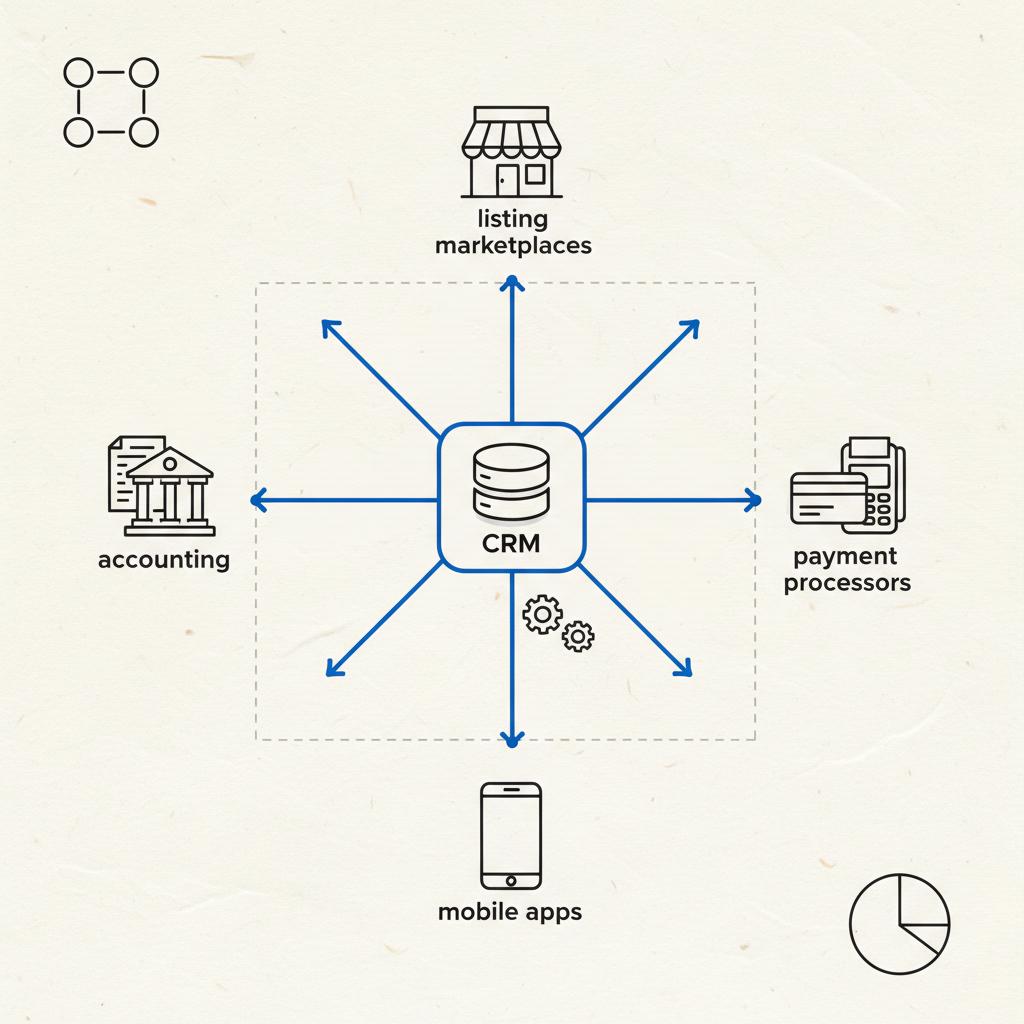
If you prefer hands-on help, get help from Agency VISIBLE to map your needs, run pilot tests and design a migration plan that minimizes downtime and confusion.
Trends shaping the next few years
Expect these developments to influence future buying decisions:
- More automation in tenant screening and communication (AI-driven suggestions and auto-responders).
- Tighter listing integrations so syndication feels native rather than bolted-on.
- Portfolio analytics that provide actionable suggestions rather than raw numbers.
These shifts will move buying decisions from checklists to questions about automation quality, privacy safeguards and how the CRM connects to tools you already use.
Vendor questions to ask during a trial (the short list)
Ask these directly during demos or trials:
- Can the system handle your lease cadence and late fee rules?
- How does the maintenance workflow work on mobile devices?
- What is the process for refunds and security deposit management?
- What reporting is available out of the box and can you export raw data?
- Are payments PCI-compliant and how are fees handled?
- Is the API documented and supported with examples?
- What are typical support response times, and do they include weekends?
Real-world decision framework
Use a three-step decision framework to pick the best property management CRM for your situation:
- Map needs: List your must-haves vs nice-to-haves now and in three years.
- Run trials: Use real data and involve at least one power user from each team (leasing, maintenance, accounting).
- Check references: Ask vendors for customers in your size and market and probe migration stories.
Examples: why different tools win for different people
There is no universal winner, only the right winner for the job. For solo landlords, the best property management CRM is often the one that minimizes setup time and monthly surprises. For mid-sized companies, the winner balances accounting, marketing and maintenance with predictable per-unit costing. For enterprise operators, the winner is the platform that offers robust integrations, SLAs and dedicated implementation resources. (See an independent roundup at The Close.)
Common feature tradeoffs and practical advice
Feature tradeoffs are unavoidable. Here’s how to think about common ones:
- All-in-one vs modular: All-in-one reduces friction but can lock you into vendor processes. Modular gives flexibility but adds integration overhead.
- Native payments vs external processors: Native payments offer tighter UI, but check rates and fee transparency. External processors may offer lower fees but require extra setup.
- Mobile-first vs desktop-first: Mobile-first tools are great for on-site teams, while desktop-first tools often provide richer reporting for back-office staff.
How to keep momentum after go-live
Launch day isn’t the finish line. Keep momentum by:
- Running weekly check-ins for the first month.
- Logging and prioritizing feedback from users.
- Maintaining a short FAQ and task guide for common workflows.
Measuring ROI
Calculate ROI by combining time savings and cost reductions. Estimate hours saved per week on rent reconciliation, maintenance coordination, and lead follow-up. Multiply by hourly rates and compare to software and migration costs. Track this for three months after go-live to see the real impact.
Closing advice
Choose a CRM that reduces daily friction and aligns with how you plan to grow. Treat trials as true experiments, involve real users, and don’t underestimate migration and training costs. When in doubt, favor clarity and adoption over an impressive feature list—because software you actually use will always outperform software that looks great in demos.
Need a hand translating your portfolio into concrete requirements? I can help craft a shortlist and a sample vendor request to run a fast, practical trial.
Final note: the best property management CRM is the one that lets you spend less time on admin and more time on the work that matters: keeping properties occupied, residents happy, and the books accurate.
For small portfolios, simplicity and quick onboarding usually beat enterprise features. Look for a property management CRM with straightforward tenant portals, reliable online payments, exportable accounting ledgers for your bookkeeper, and mobile maintenance ticketing. Flat subscription tiers can be more cost-effective than per-unit pricing for smaller portfolios.
Choose native accounting if you want fewer systems and simpler daily bookkeeping—it's great for high-frequency tasks. Choose an integration if your accounting workflows require specialized reports or if your bookkeeper already relies on a particular ledger system. The right choice depends on the complexity of your finances and how much flexibility you need.
Call in external help when your migration involves bulk historical financials, complex integrations (ERP, payroll, bank feeds), or when you need scripted automations. A specialist can shorten the learning curve and reduce downtime. For a practical, implementation-focused partner, consider agencies that understand property workflows and offer migration sequencing and change management.





